Commissions: plans, statements, splits & payouts
The Commissions screen (sidebar → Commissions) separates two jobs with a Design | Operate switch at the top — because configuring the comp program and running the period are different work for different people (and, for audit, different responsibilities):
Design — the signed rate-card library, changed rarely and deliberately:
Rate cards — the commission plans: versioned rate cards that producers sign.
Splits — effective-dated rules dividing a writer’s base commission across payees.
Scenarios — what-if rate changes, each targeting one scoped rate line, simulated against real history before you commit them.
Operate — the recurring period run, as a pipeline you follow left to right:
Statements — per-producer commission statements, verified against the agreed plan rates and the distribution hierarchy.
Reconcile — the exceptions blocking a clean close, surfaced as triage tiles: unrated policies that resolve to no rate at all (the tile carries the premium exposure — the dollars at risk) and policies missing an original inception date (tenure gaps). Resolve each inline, or follow its link back to the plan in Design to fix the root cause.
Pay — settled net-pay payout instructions and their payment status.
The flow rail across the Operate pipeline flags amber the moment a stage needs attention — a variance to reconcile, an unrated policy, a held payout.
(An upline’s override earnings rolled up across their downline — formerly a Commissions tab — now live on the producer’s Hierarchy tab; see roll-up.)
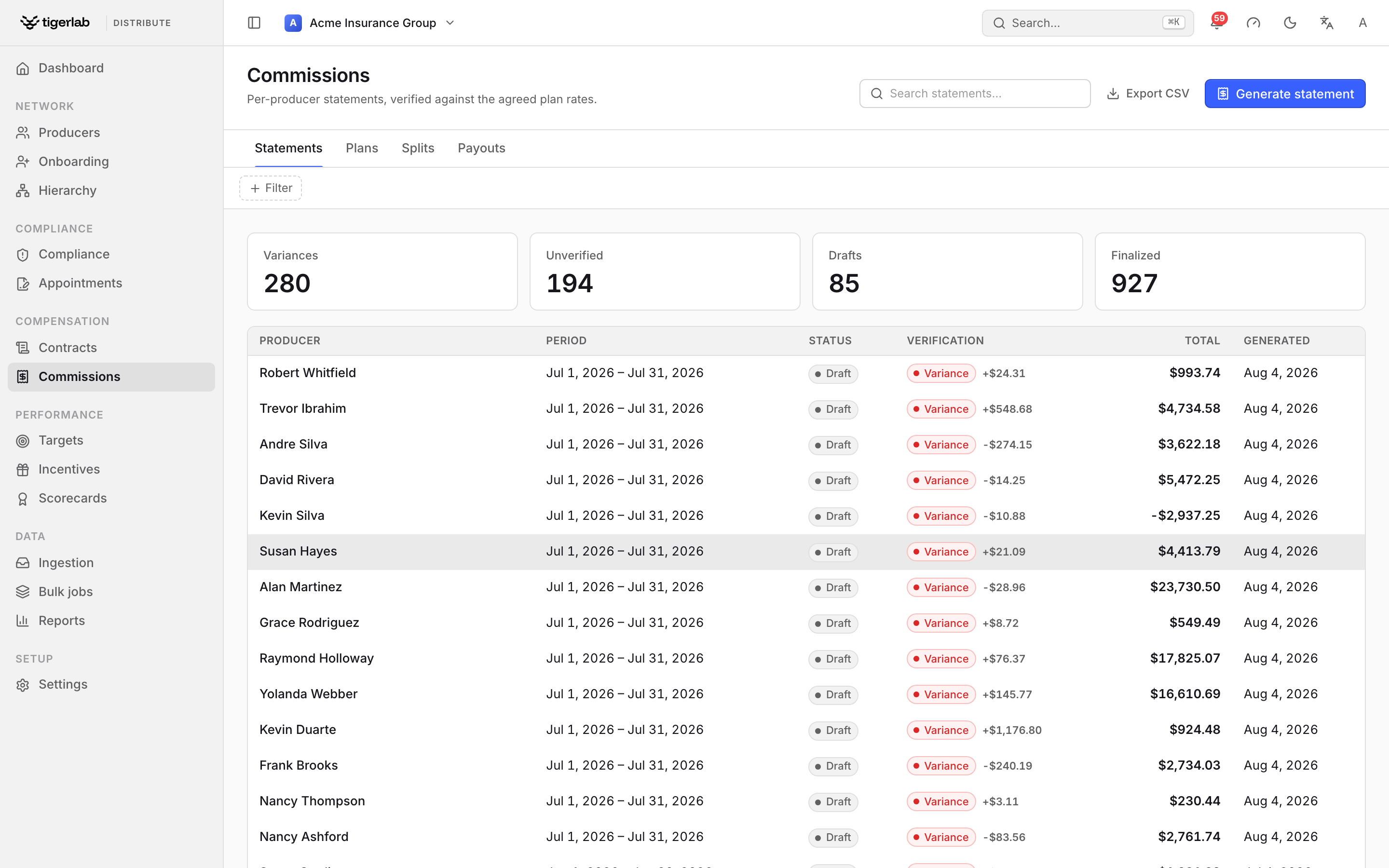
The Commissions screen, in Operate mode. The Statements stage verifies each per-producer statement against the agreed plan rates — the Verification column flags any variance — with the Reconcile and Pay stages alongside on the flow rail, and the Design switch (rate cards & splits) top-right.
One principle drives the whole domain: tigerdistribute never moves money. Your PAS disburses commissions; the platform holds the agreed rates (the signed rate card), verifies what the PAS reports against them, computes each producer’s entitlement — base, overrides, splits — and, when payout instructions are enabled, settles every finalized statement against the producer’s debt ledger and instructs the PAS what to pay (payouts).
Money and currencies
Every amount on the platform is stored in its native currency (ISO 4217). Your tenant has a base currency (Settings → General): the default for new money records and the target that cross-currency totals — the dashboard tile, report roll-ups, target attainment — are converted into, using the exchange rates you maintain under Settings → Exchange rates (effective-dated; the latest rate on or before the conversion date applies). A missing rate is never papered over: totals show which pair is missing, and operations that need the conversion refuse with an actionable message.
Two things are single-currency by construction and never converted:
a commission plan — the rate card is denominated in one currency, chosen when it is created (flat amounts use it, and it locks with the signed schedule);
a statement — there is one statement per producer, period and currency. A producer with USD and EUR activity in the same period gets two statements, each badged with its currency.
Commission plans — the signed rate card
A commission plan is a named, versioned rate schedule with an effective window, denominated in a single currency. Its rate lines are percentage rates or flat amounts (in the plan’s currency), optionally scoped by product, writing company, line of authority or producer tier — and, for schedules that vary with the policy itself, by:
transaction type — new business vs renewal;
policy status — the policy’s lifecycle state (in force, lapsed, cancelled, paid-up, pending, expired); and
a policy-year band — a heaping or trail schedule that pays a high first-year rate and lower rates thereafter (e.g. policy year 1 → 80%, years 2–10 → 5%, year 11+ → 2%). Policy year is 1-based and measured from the policy’s original inception date (see readiness); a policy whose inception is unknown never matches a policy-year band.
Each of these is optional: a blank dimension matches any policy, so a plain product rate behaves exactly as before. When a flat amount meets a policy written in a different currency, the expectation is converted at the policy date using your exchange rates. When a statement is verified, the most specific matching rate wins (tier match first, then product over company/line-of-authority scope, then a line that also pins the policy’s transaction type, status or policy year over a more general one), and a tier bump — a rate line with only a tier and no product/company scope — is added on top of the resolved base rate.
The Plans tab lists each plan with its version pill, effective window, rate and producer counts, and whether it is locked (green “locked 〈date〉”) or still editable (yellow).
From signable schedule to locked rates
A plan becomes contractual through the contracts module (Contracts & e-signature):
Open the plan and click Draft schedule… — this drafts a commission schedule contract titled “Commission Schedule · 〈name〉 v〈version〉”, rendered from a schedule template that merges in the plan’s full rate table (optionally attached to the producer’s master agreement as an exhibit); the plan’s schedule exhibit links to the contract’s own page.
Send it for signature as any other contract.
The moment the producer signs, the plan version locks: its rates are frozen, permanently.
A locked plan refuses every rate edit with “Plan ‘〈name〉’ v〈version〉 is locked by a signed commission schedule; create a new version to change rates.” There is no unlock — what a producer signed stays verifiable forever.
Changing rates: cut a new version
To change a locked (or any) plan, click New version… and pick the cutover date. The platform copies every rate line into an editable v〈n+1〉, closes the old version’s window the day before the cutover, and rolls producer assignments forward: open-ended assignments are split at the cutover so past periods keep verifying against the old rates while new periods use the new version. The toast confirms “〈name〉 v〈n〉 drafted — assignments rolled forward”.
Edit the new version’s rates, then draft and send its schedule for signature — signing locks it in turn.
Capping a plan’s payout
A plan can carry an optional period cap — the most commission payable to a producer on that plan per statement period, in the plan’s currency. Set it in the Period cap field when you create the plan (leave it blank for no cap); it copies forward when you cut a new version, just like the rate lines.
When a period’s commission exceeds the cap, the statement gains a withheld line — “Withheld · plan cap 〈currency〉 〈amount〉 for the period” — for the overage, and the statement’s payable total drops to the cap. Because the platform never moves money, this simply lowers what the payout instruction tells the PAS to disburse (the withheld line keeps the statement’s lines summing to the capped total).
The cap is a payability ceiling, not a verification result: it only touches the payable total, never the rate-card expectation. A capped statement whose received commission matched the plan still reconciles as matched — the rate card expected the full amount; the cap merely withholds part of the payout. The cap applies only to statements in the plan’s own currency.
Assigning producers to plans
A statement can only be verified if the platform knows which plan covered the producer for the period. That is a plan assignment: producer + plan + Effective from, optionally Until (leave empty for open-ended).
Assign from the plan’s detail page (Assign producer…) or from the producer’s detail page (Assign plan… on the Commission plan card, which also shows the assignment history).
Overlapping assignments are refused: “The producer already has a plan assignment overlapping this period; close it first.”
Onboarding default — mark one plan as the tenant’s default (Make onboarding default, confirmed inline, on the plan’s detail page): every producer approved through onboarding is assigned to it automatically, effective the approval date (Onboarding producers).
A producer with no assignment for a period falls back to their own default commission rate for expectation purposes; with no basis at all, the statement simply shows unverified.
Readiness: policies missing an inception date
A rate line scoped by policy year (a heaping or trail schedule) can only apply to a policy whose original inception date — the day it was first issued, carried unchanged across every renewal — is known. That date is the anchor the platform measures years in force from; a renewal’s own effective date is not the inception (it is that term’s start).
When a policy is covered by a plan that carries policy-year bands but reached the platform from your PAS without an inception date, its policy year cannot be determined, so the banded rate cannot apply. Rather than guess a value — which would mis-rate business fed in mid-life — the platform surfaces it on the Tenure gaps triage tile as a known gap to close, instead of letting it silently fall through to a more general rate.
Each row shows the producer, policy, transaction type, effective date and the governing plan. A manager supplies the original inception inline; because inception is a property of the policy, the value applies to every ingested transaction row of that policy (its new business and every renewal), and the gap then clears. Members see the list read-only. Regenerate the affected statements to apply the new policy-year rating.
The durable fix is upstream: have your PAS send inception_date on
every policy fact (Integrations: PAS data & webhooks) so new business and renewals
arrive already anchored. The tile reads “every policy under a
policy-year-based plan has an inception date” when nothing needs
attention.
Unrated policies
A second triage tile, Unrated policies, surfaces the queue of policies that resolve to no commission rate at all — and carries the premium exposure (the dollars at risk, totalled in your base currency) so the size of the problem reads at a glance. A producer assigned to a plan is priced only off that plan; if the plan has no rate line matching the policy’s product / company / line of authority / transaction type / status / policy year, the policy is held as an exception rather than silently paid at a rate nobody signed. (This behaviour is the Unrated policy handling setting — the safe default — which a tenant may switch to fall back to the producer’s default rate; a producer with no plan always uses their default rate. See Tenant setup & administration.)
Unrated policies never vanish: each appears on the statement as a visible $0 line (reason “No plan rate for the product”) and in the queue, ordered by premium exposure then age. A manager closes each by adding a rate line to the plan, assigning a plan — or waiving the policy inline (a deliberate, audited $0 designation, e.g. a run-off book), which applies to every row of that policy and marks its line “Commission intentionally waived”, distinct from an open gap.
How statements are built
Statements are built from the data ingested from your PAS (Integrations: PAS data & webhooks), in one of two modes set per tenant (Tenant setup & administration):
- PAS sends calculated commissions (the default — verify mode)
Statement lines are the commission transactions the PAS reported (base, override, bonus, chargeback). Independently, the platform computes what each producer should have received — base commission from the plan (net of splits), incoming split shares, and override commission from the hierarchy — and compares.
- Policies only — platform calculates (calculate mode)
The PAS sends policy facts only; the statement lines are the platform-calculated entitlement per policy: base lines (net of splits), split-share lines, and override lines.
Cancellation clawbacks (calculate mode)
In calculate mode, a policy cancelled in the period reverses the commission it earned — a negative chargeback line, shown alongside the original commission rather than netted into it (base, incoming split, and hierarchy override are all clawed back). A statement whose total goes negative carries the balance forward as producer debt, recovered from the next positive statement (the debt ledger, Managing producers).
How the reversal is computed is the commission earning model, which differs by line of business:
- As earned (the default — P&C, workers’ comp, marine, health, …)
The commission reverses in proportion to the premium the carrier reports on the cancellation. The carrier has already worked out the returned premium (pro-rata, short-rate, an exposure audit, a declaration adjustment); the platform simply applies the rate to it, so every premium basis is handled without the platform re-computing proration.
- Advanced with chargeback schedule (life / annuity)
The commission was advanced on the original premium, so a cancellation claws it back on a schedule keyed to the number of months since the policy’s inception, entered as
{through month, percent}bands (e.g. months 1–6 → 100%, 7–12 → 50%). A cancellation past the last band reverses nothing.- None
No automatic clawback (for a contract with no chargeback clause).
Because the model belongs to the line of business, it is resolved for each cancelled policy through a most-specific-wins cascade: the matched rate line (a contract-specific override) → the product → the product’s line of authority (set once per line — Settings → Lines of authority) → the workspace default (Settings → General). A producer who writes both life and P&C therefore gets the life schedule on their life cancellations and as-earned reversal on their P&C ones, from a single statement run.
Note
Clawbacks apply only in calculate mode; in verify mode the PAS reports its own chargeback transactions and the platform passes them through. For as-earned lines, send the cancellation’s returned premium on the policy fact (the platform uses its magnitude); for advanced lines, send the original premium and the inception date so the schedule can be applied.
Generating a statement
On the Statements tab, click Generate statement.
Select the Producer and the Period start / Period end (the current calendar month is pre-filled).
Click Generate.
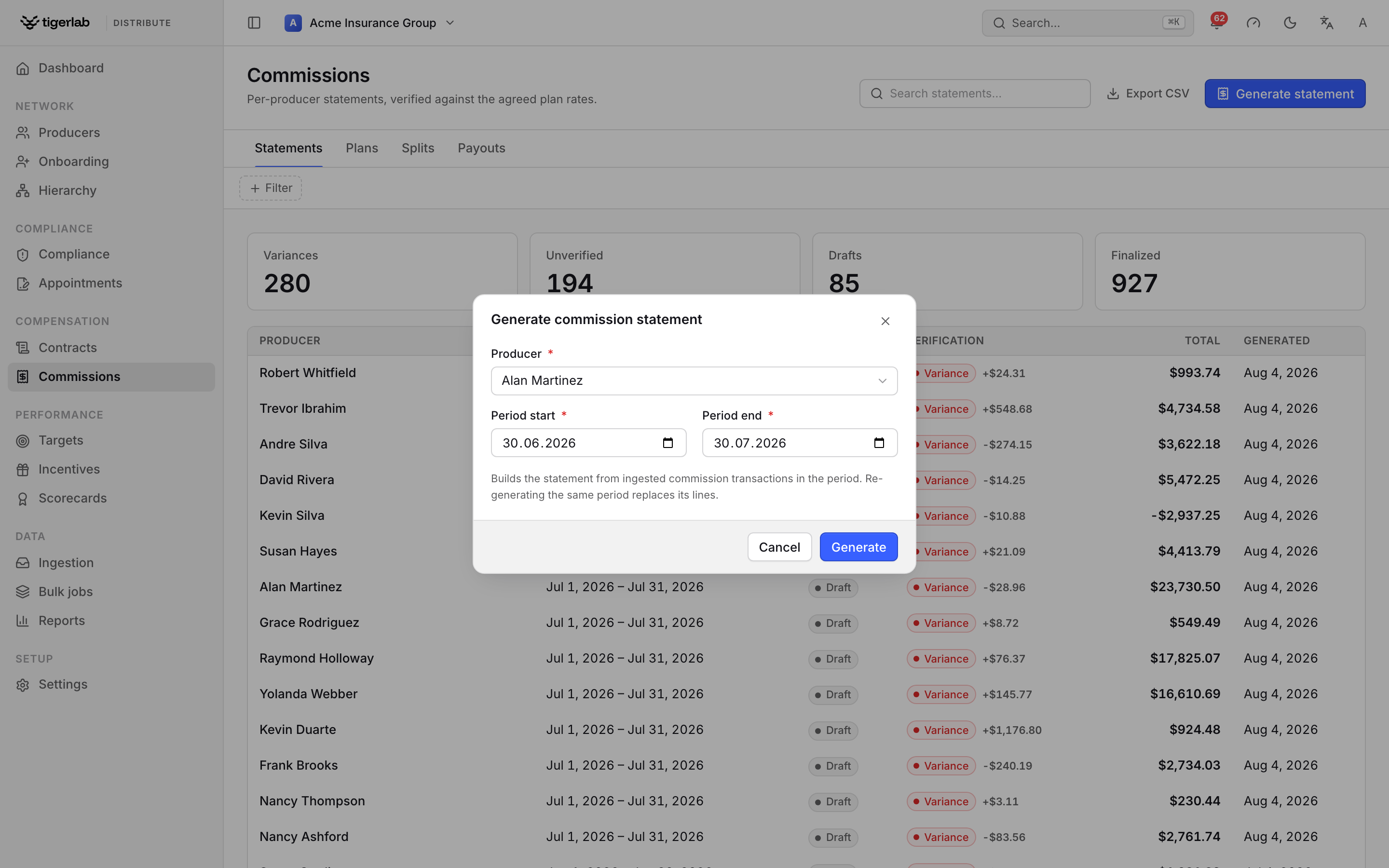
Generate statement builds a draft from the commission transactions ingested for that producer and period.
Note
There is one statement per producer, period and currency — generating produces one statement per currency present in the period’s data, and re-generating the same period replaces lines and totals with the current ingested data (statements in currencies that no longer have data are cleaned up). This is the intended way to refresh a draft after new transactions arrive.
Periods for the same producer and currency may not overlap: to catch a late transaction, regenerate the same period rather than a longer one, or pay/discard the existing statement first. Generating a period that overlaps a live (draft or unpaid) statement is refused, so a transaction can never be paid through two statements. Each commission transaction is claimed by exactly one statement.
Statements are created as draft. Finalizing (the Finalize button on the statement page, captured inline) locks the statement permanently, emails the producer, makes it visible — and disputable — in their self-service portal (The producer portal), and, when payout instructions are enabled, settles it into a payout instruction (payouts). The finalize confirmation shows the settlement preview first: gross, outstanding debt, recovery and the resulting net pay, plus a warning if the producer is currently blocked from payouts.
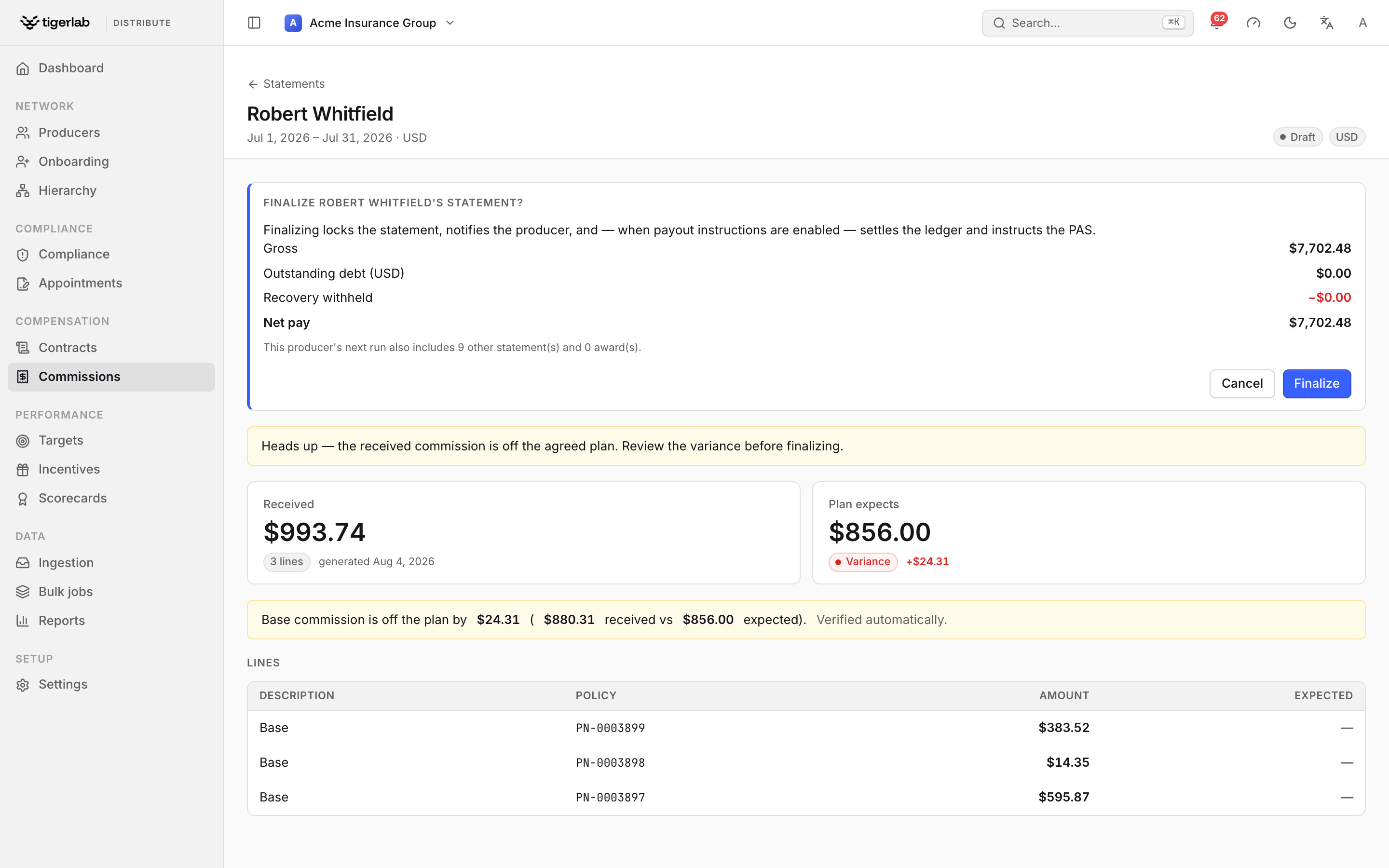
The Finalize confirmation previews the settlement — gross, outstanding debt, recovery withheld and the resulting net pay — and notes any other statements the producer’s next payment run will include, before you lock the statement.
Note
A finalized statement is a snapshot and is never regenerated. If the PAS later re-sends a corrected commission amount or policy premium for something that fed a finalized statement, the corrected figure is stored (the PAS is the source of truth) but the finalized statement is left intact and its verification flips to Stale — it sorts to the top of the triage list, and its reconciliation names exactly what changed. Stale means what a producer was told/paid may no longer match source-of-truth; investigate and, if needed, correct it on a future period’s statement. The change is also recorded in the audit log.
Reading and verifying a statement
The Statements tab is triage-ordered variance-first, with KPI tiles (Variances / Unverified / Drafts / Finalized) across the top. The statement’s detail page shows up to three tiles: Received (the statement total, line count and generation date), Plan expects — when the plan could be resolved — with the expected base total and the verdict, and Overrides expected — when the producer has override-earning hierarchy links — with the override total the hierarchy predicts:
matched (green) — “Base commission matches the plan — 〈amount〉 expected and received.”
variance (red) — “Base commission is off the plan by 〈diff〉 (〈received〉 received vs 〈expected〉 expected).”
unverified (gray) — “Not verified — no commission plan covers this producer for the period, so there is no agreed rate to check the amounts against.” Assign a plan to fix this.
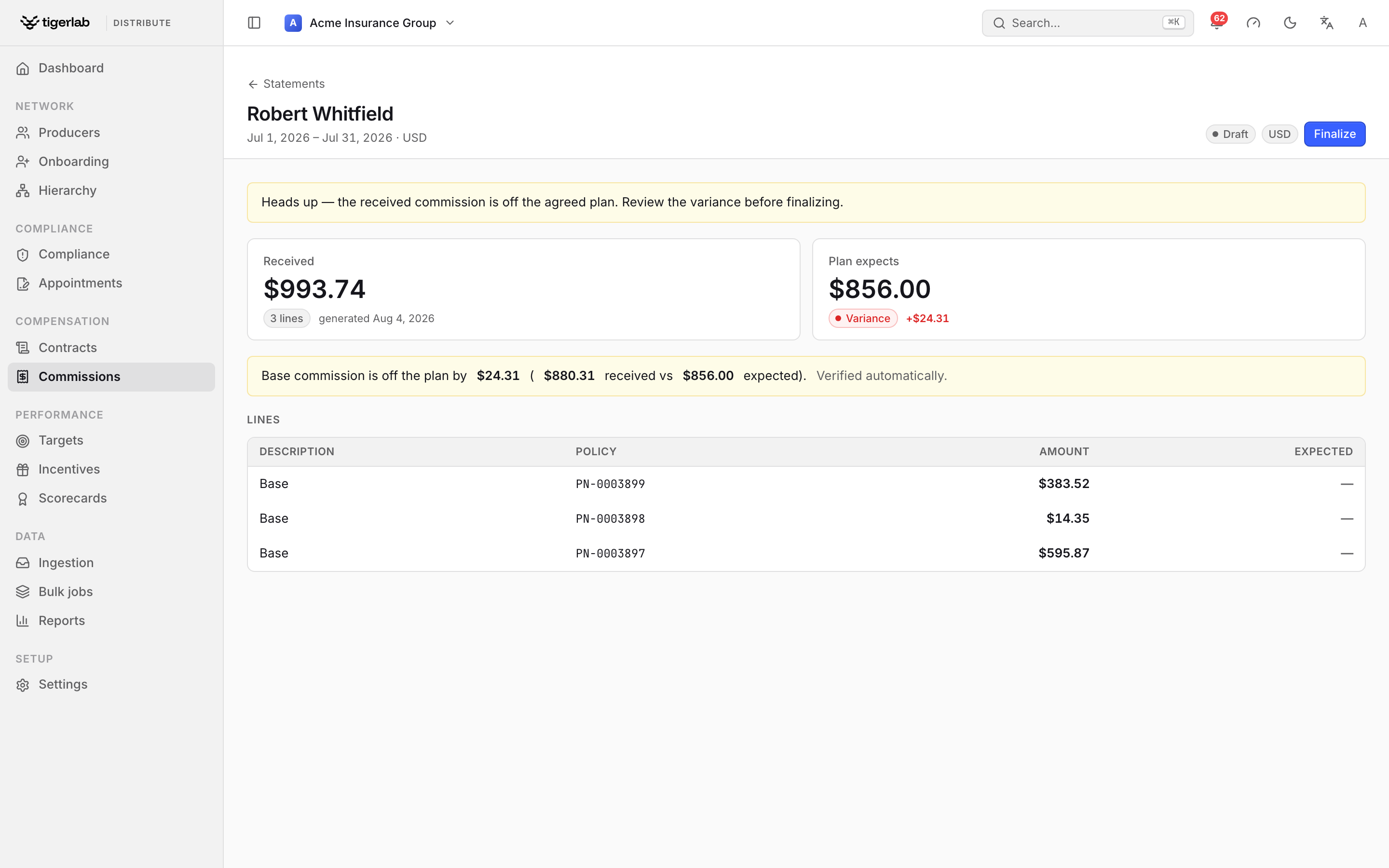
A draft statement in variance: Received versus Plan expects, the per-line detail, and a Finalize action in the header. The banner prompts you to review the variance before finalizing.
Verification follows the period’s policy cohort: policies written in the period are expected, and payments against them are counted even if the PAS pays a little into the next period — so timing alone never flags a variance. How far past the period end a late payment still counts is the verify grace window (Settings → General → Verify grace window, default 30 days); set it to your carrier’s typical remittance lag. A payment dated beyond that window — most commonly a renewal-year commission on the same policy number a year later — is not counted toward this period, so it can neither hide a real underpayment nor inflate the period’s received total. Two sides are verified independently, and matched requires both:
Base (and split shares) — what the plan predicts for the producer’s own policies, net of splits given away, plus incoming split shares (see splits).
Overrides — what the hierarchy predicts from the producer’s override-carrying links (see overrides); PAS override transactions verify against it, and the reconciliation records the override expected/received/variance separately.
Bonuses and chargebacks are shown on their lines (with colored kind pills) but stay outside verification.
The Lines table shows each line’s description, policy, amount and expected amount. A cohort policy the PAS never paid base commission on appears as a zero-amount line — “Expected commission not received · 〈policy number〉” with a yellow not received pill. These are your “money missing” rows.
Reconciliation runs automatically on every generation in verify mode. A manual reconciliation (recording an expected amount yourself) is a whole-statement judgment: it takes precedence, clears the override columns, and is never overwritten by the automatic one.
Override commission
When a hierarchy link carries an override rate (Distribution hierarchy), the upline earns that percentage of the written premium of every policy written by producers in the branch beneath that link — at any depth, in the policy’s own currency. A link that was terminated before the period (or starts after it) contributes nothing, and a terminated link mid-tree severs everything below it.
On the upline’s statement this appears as:
verify mode — PAS override transactions annotated with the expected amount and link rate, plus zero-amount “Expected override not received” lines for downline policies the PAS never paid an override on; the reconciliation carries a separate override verdict.
calculate mode — “Override commission · 〈policy〉” lines, included in the statement total.
An upline whose downline writes in a currency the upline has no other activity in still gets a statement in that currency — override money is real money.
Split commissions
A split rule (Splits tab → New split) gives a payee a share of a writing producer’s base commission: writer → payee, a percentage of the writer’s base, optionally scoped to one product, over an effective-dated window. Rules are validated so the fractions a writer has promised away can never exceed 100% for any overlapping window and product scope (an all products rule counts against every product).
Splits apply by the policy’s written date and show up on both sides:
the writer’s expected base for a covered policy shrinks to their retained share;
the payee’s statement gains the share — in calculate mode as a “Split share (〈%〉) · 〈policy〉 · 〈writer〉” line, in verify mode as an expectation that the PAS-paid amount reconciles against. A share the PAS never paid appears as a zero-amount split line and a variance — exactly the signal that the PAS and your split agreements disagree.
The writer’s retained share and every payee share are allocated together so they always sum back to the un-split commission — a split that doesn’t divide evenly never manufactures or loses a cent. The split rounding policy (Settings → General, overridable per rate card) decides who takes the leftover cent: largest remainder (the fair default — the party with the biggest fractional share), writer absorbs, or payees absorb.
Deleting a rule only affects future generations of draft statements; prefer setting an end date so history stays explicit.
Rate scenarios (what-if)
Design → Scenarios models a rate change before you commit it. A scenario targets one scoped rate line — the same scope a rate card line carries (product, transaction type, policy status, tenure band, producer tier) — so it never disturbs the rest of a product’s ladder.
New scenario — name it, enter the proposed rate (in %), and set the scope. Leave a dimension blank for any; leave the product blank to model the whole book (simulate only).
Simulate — the platform sums, over exactly the policies in that scope, the commission you actually paid (baseline) and what the proposed rate would cost on the same premium (projected), and shows the delta. Because both sides use the same scope, the delta is a like-for-like comparison — not one product’s projection against the whole book’s actuals.
Apply — writes the proposed rate onto the one matching rate line of the active plan (creating that scoped line if it doesn’t exist yet). A signed rate card is never edited in place: the rate lands on a freshly cut version. Only product-scoped scenarios can be applied.
Scenarios are drafts you can re-simulate and delete; applying is the only step that changes a live plan.
Statement disputes
Producers can question a finalized statement — or a single line — from their portal. Each question becomes a dispute (open → in review → resolved or rejected), and tenant managers are notified in-app the moment one is raised.
Disputes appear at the bottom of the statement’s detail page with the producer’s message. Resolve or Reject it inline with notes — “the producer is emailed this explanation” — describing what was checked and what happens next. Money never moves here: a resolution that changes amounts plays out in the PAS and shows up on future statements.
Payability — “is it safe to pay this producer?”
The platform continuously derives a per-producer payability verdict from three requirements, all of which must hold:
Producer active — status is active;
Actively licensed — at least one active, unexpired license;
E&O current — active, unexpired E&O coverage.
The verdict is re-evaluated by the daily monitoring sweep (Compliance monitoring) and shown on the producer’s detail page as a Payability card (“Safe to pay commissions” or “Commission payout blocked”, with the per-requirement evidence) and a header pill. Producers see the same standing on their portal overview.
Payability is a signal to your PAS, not a block inside the
platform: when a producer’s verdict flips, a
ProducerPayabilityChangedV1 event is published to your webhook
subscribers (Integrations: PAS data & webhooks) so the PAS can suppress the producer
from its next payment run — and payouts resume automatically once the
producer is back in good standing. With payout instructions enabled,
payability also gates settlement: a blocked producer’s instruction is
created held and is not sent to the PAS until released
(payouts).
Payouts: payment runs
With payout instructions switched on (Settings → General; default off — a deliberate go-live step for the PAS integration), earning and paying are separate steps. Finalizing a statement or approving an award only marks the money payable; a payment run turns payables into instructions.
A run gathers everything currently payable for a producer — finalized statements and approved awards that have not been paid yet — and, per currency, produces one consolidated payout instruction:
Consolidate. All payable statements and awards in a currency are summed into one gross. A producer earning commission and a bonus in the same currency gets a single deposit, not two.
Net debt at run time. The gross is settled against the producer’s same-currency debt ledger (Managing producers) using the current balance: outstanding debt is recovered first — the whole balance by default (full offset), or at most the tenant’s debt recovery cap per run when one is set. A negative pot carries forward as new debt instead of paying anything.
Apply the minimum. If the producer has a minimum payout (Managing producers) and the net — converted to the base currency — falls below it, and there is no debt in play, no instruction is created and the payables roll into the next run. Pots that recover debt always run, so debt keeps amortising.
Publish. Unless held, the instruction is published: a
PayoutInstructedV1event goes to your webhook subscribers (Integrations: PAS data & webhooks) listing every source it consolidated, telling the PAS exactly what to disburse.
An instruction is created held instead of published when the producer’s payability is blocked (held: payability blocked — Release it once their standing is restored) or when there is nothing to pay (held: nothing to pay — zero net after recovery, or a carry-forward; these stay held by design).
When runs happen
Each producer has a payment cadence (Managing producers):
Immediate (the default) — a run fires inline the moment a statement is finalized or an award approved, so behaviour matches the pre-payment-run model: one instruction, right away.
Weekly / Monthly / Quarterly — a nightly sweep runs the producer once per cadence period (the week starting Monday, the calendar month, the calendar quarter), consolidating everything that accrued since the last run. The period opens on its anchor (Monday, the 1st, the quarter’s first day) and stays due until a sweep closes it out — so a producer is paid on the anchor day and, if that night’s sweep did not run, on the next night it does.
Finance can also trigger a producer’s run on demand with Run payment now on the producer’s ledger tab — idempotent, so it is safe to re-press.
Note
A missed sweep catches up automatically. Due-ness is “has this period been swept yet?”, not “is today the anchor day?” — so if the nightly sweep is skipped on the anchor date (a worker outage, a deploy window), the next sweep to run still finds the period open and pays the producer exactly once, rather than silently skipping the whole payout cycle until the next period. The instruction’s run date then shows the day the catch-up actually ran — a legitimately later date is a real operational signal, not an error. (Sweeps triggered on their schedule use the scheduled date even if the job itself starts a little late; only a genuinely delayed catch-up shifts the run date.)
When a producer can’t be paid
The nightly sweep pays each due producer in isolation. If one producer’s run raises an error — a bad exchange rate, corrupt data, a transient outage mid-sweep — that producer is skipped, and the rest of the sweep still completes. A single poisoned producer can no longer starve everyone else’s payout for the night, and a retry of the sweep no longer keeps re-hitting the same failure forever. The skipped producer’s own writes roll back cleanly (nothing half-paid), and they stay due, so the next sweep tries them again.
Skipped producers surface as a failures list at the top of the Payouts tab: each row shows the producer, when they last failed, how many runs in a row have failed, and a short reason. It is a self-clearing queue — a producer drops off it automatically the moment a later run pays them. Open a row to jump to the producer’s ledger and, once the cause is fixed, Run payment now to settle them without waiting for the next nightly sweep.
Tenant managers are also notified when a run skips producers, but the alert is de-duplicated: a producer is flagged when it first fails and again only if it keeps failing across many runs, so a persistently broken producer does not generate a fresh alert every single night.
The Payouts tab lists every instruction with its run date, producer, sources (e.g. 2 statements · 1 award), gross, recovered, net pay and status, and carries the lifecycle forward:
published → acknowledge — the PAS confirmed receipt;
published/acknowledged → mark paid — the money went out; record the PAS payment-run reference for the audit trail. Marking an instruction paid also closes every incentive award it consolidated.
A statement’s detail page shows a payout panel once its run has produced an instruction — linking to the payout’s own page; when the instruction consolidated more than that one statement, the panel says so.
Note
Recovery never crosses currencies: USD debt waits for USD earnings; a EUR pot pays out in full regardless. The minimum-payout check does convert net into the base currency (at the run date) to compare against the threshold, but the instruction itself is always in the pot’s own currency.
Roll-up: override earned across the downline
The Roll-up view — on a producer’s Hierarchy tab (Distribution hierarchy), shown once they have a downline — answers a manager’s question: how much override did I earn on my team this period? Pick a period, and the platform lists every downline member beneath that producer’s override-carrying hierarchy links — the same members that drive override verification on statements (Distribution hierarchy) — each with its depth, the override rate it hangs under, and the member’s in-period written premium and override earned, in the member’s own currency.
Below the table, totals are shown per currency (never summed across currencies — different currencies stay on their own lines). A member who wrote nothing in the period shows a dash rather than a zero-value row.
The roll-up is read-only: it computes over ingested policy data on demand and creates no statement or ledger rows. It answers “what did the upline earn on production” — the payout of those overrides still flows through each upline’s own finalized statement and payout instruction, exactly as described above.
Commission plans vs what-if scenarios
A commission scenario answers “what would a rate change cost?” by replaying history: it takes a proposed rate (optionally limited to one product) and compares the baseline (what was actually paid, from ingested transactions) with the projected total (ingested premium × the proposed rate), reporting the delta.
A scenario moves draft → simulated → applied: create it with a
name and proposed rate, simulate it to compute the totals, and
apply it to adopt the rate change. Applying writes the rate into
the tenant’s active plan — and if that plan is locked by a signed
schedule, a new version is cut automatically, so the rates
producers signed stay intact. The computed totals are always produced
by the simulation — they cannot be edited by hand.