Performance cycles
The Performance screen (sidebar → Performance) carries a Design | Operate switch at the top, the same split as Commissions:
Design — the reusable library you build once: the reward programs (and, over time, rule templates and tier bands) that cycles draw on.
Operate — the run: the cycles you compute, approve and settle, and the producer scores leaderboard.
A cycle is the heart of the Operate side. It covers a period (annual, quarterly or monthly) and carries everything that happens in it: the goals you set, the rewards that pay on top of them, the earnings the platform computes, and the payouts you approve and pay.
Note
Performance now hosts what used to be three separate screens:
Reward Library is Design → Reward programs, and Scorecards
is Operate → Scores; their old /rewards and /scores links
redirect into the toggle. Production goals are the Goals of a
cycle, and old /targets links redirect here.
The cycle list
The Performance screen lists your cycles — name, period type, dates, elapsed progress and status — with a search box and status/period filters in the header. Click a cycle to open its workspace; New cycle creates one and takes you straight into it.
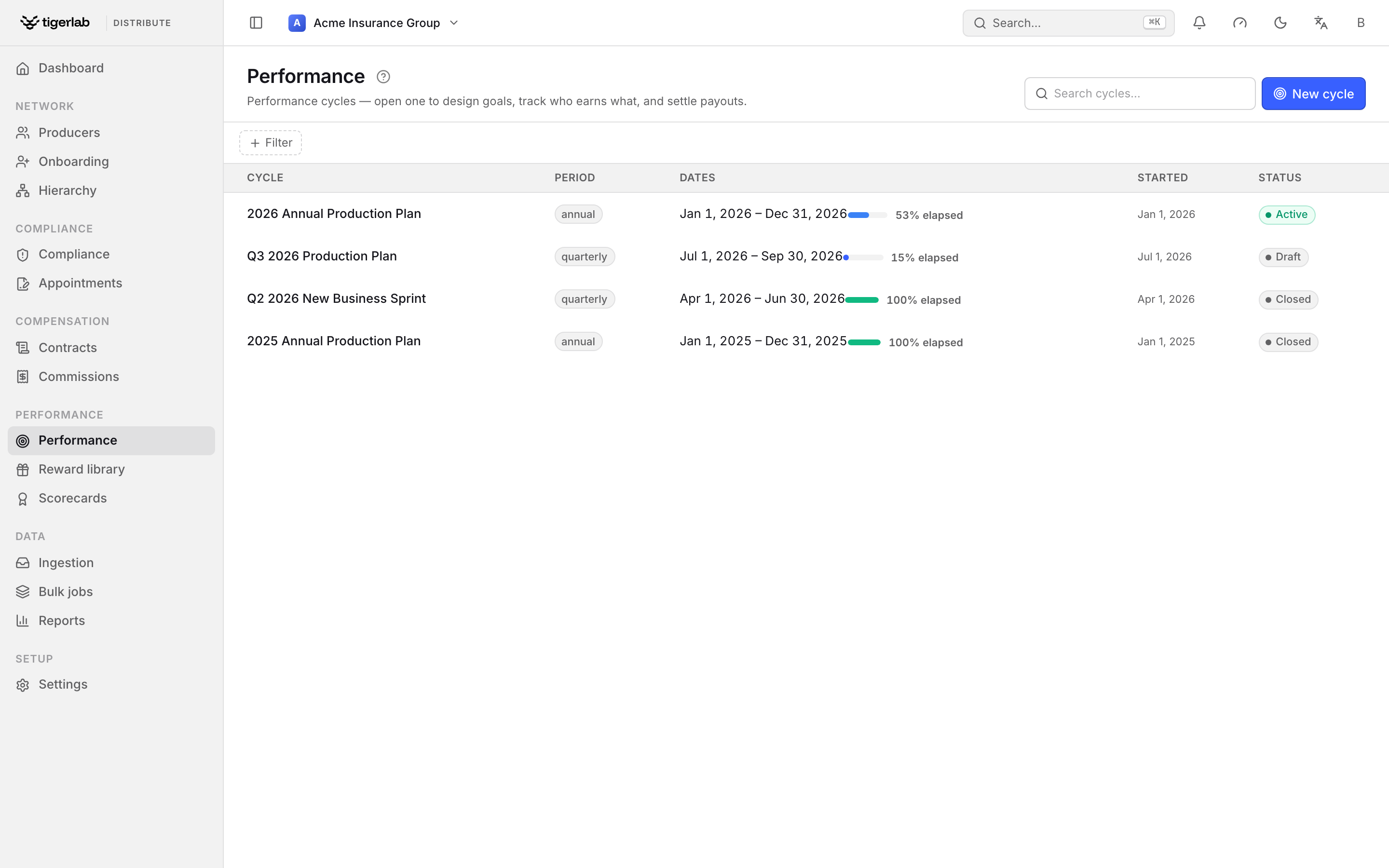
The Performance screen lists your cycles (Annual or Quarterly) with how much of the period has elapsed and their status. Open one to design its goals and rewards and settle its payouts.
The cycle workspace and the flow rail
Opening a cycle drops you into its workspace. The heart of it is the flow rail across the top — the four moves of a cycle, in the order you make them, each doubling as a live status read-out:
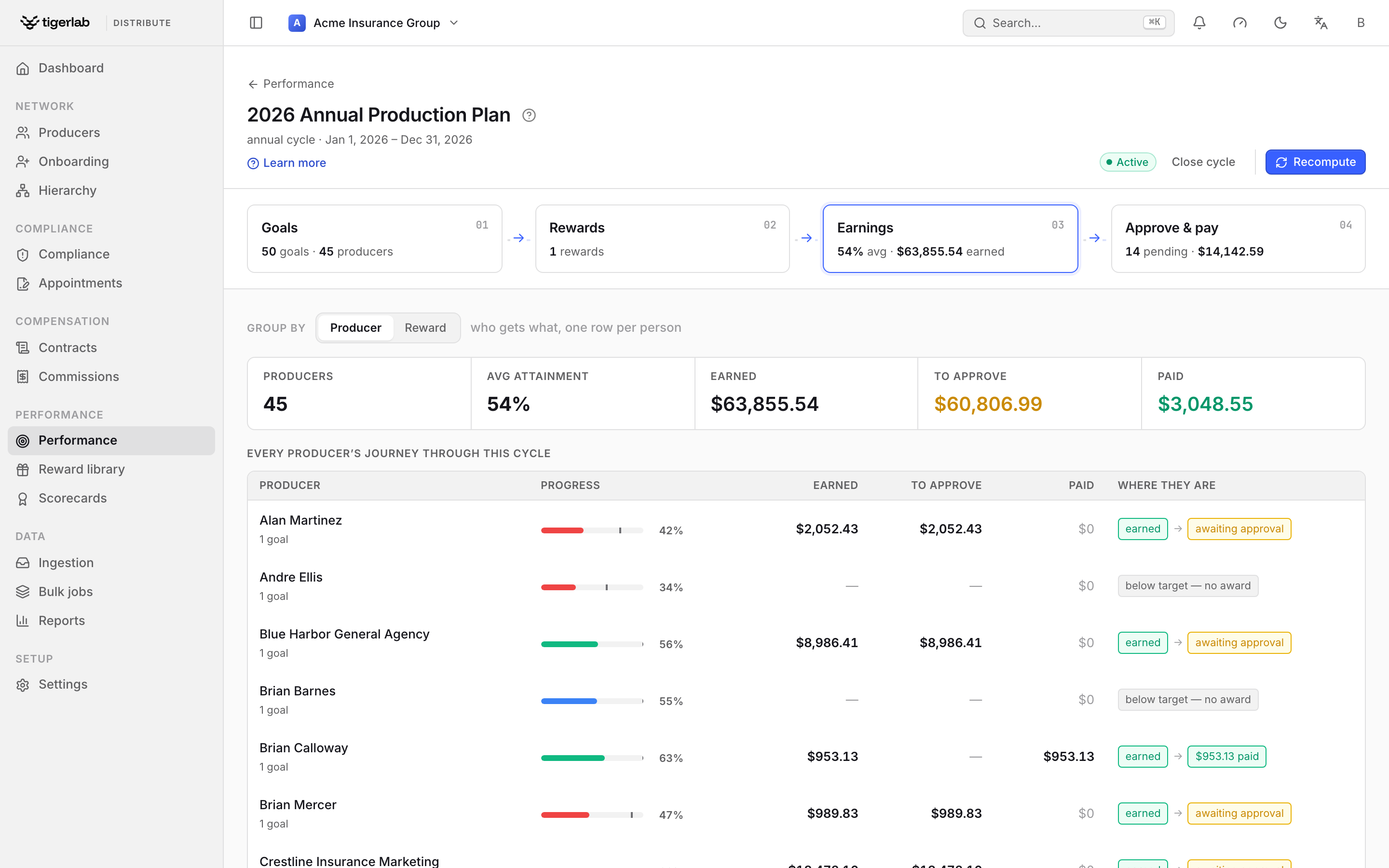
The cycle workspace. The flow rail — Goals → Rewards → Earnings → Approve & pay — is the primary navigation; below it, the Earnings step shows every producer’s journey through the cycle. A single Recompute runs the whole pipeline.
Step |
Whose move |
What it is |
|---|---|---|
Goals |
You set |
The goal lines — who should produce how much. |
Rewards |
You set |
The reward rules that pay on those goals. |
Earnings |
System computes |
What each producer has earned so far, from their attainment. |
Approve & pay |
Producer gets |
The settlement queue — approve each award, then pay it. |
One action drives each step (Add goal, Apply reward, Grant award), and a single Recompute in the header runs the full pipeline — refresh attainment, then recompute every reward’s awards — so you never have to remember which piece to update.
Cycle statuses and actions
Status |
Meaning |
Header actions |
|---|---|---|
Draft |
Being set up; attainment not yet tracked. |
Activate |
Active |
Goals in force; attainment and awards are computed. |
Recompute, Close cycle |
Closed |
The period is over; attainment stops. |
Reopen |
Goals
The Goals step holds the cycle’s goal lines — one row per target: who should produce how much. On a draft cycle, Add goal builds them; on an active cycle, attainment is measured against them.
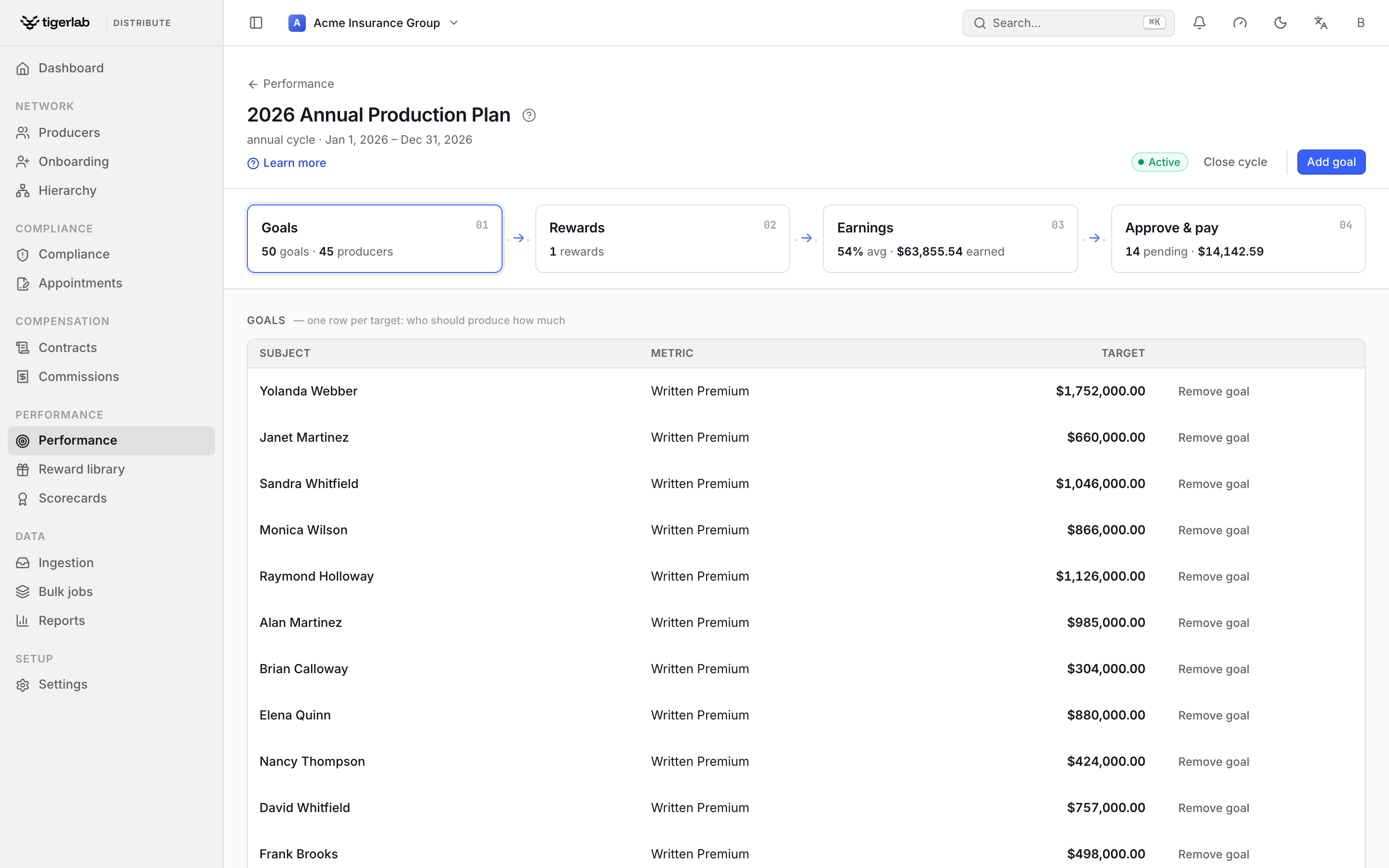
The Goals step. Each row is one goal: a subject (producer, team or tenant), the metric it measures and the target value. Attainment rolls up automatically from the production ingested from your PAS.
Each goal is defined by:
- Subject
Who the goal applies to — which also decides how actuals are counted (the roll-up):
Producer — the producer’s own production plus their entire active downline’s, so an agency’s or MGA’s goal reflects its whole network (see Distribution hierarchy).
Team — the combined production of every producer on the team.
Tenant — all ingested production across the tenant.
- Metric
Written premium, New business premium or Policy count.
- Target
The goal value (greater than zero), with optional Stretch and Floor. Premium goals are denominated in a currency (defaulting to the tenant base currency); production in other currencies is converted at attainment time, and a goal with a missing exchange rate is skipped and flagged. Policy-count goals carry no currency and count distinct in-force policies: a policy written and then cancelled within the period nets out (it does not count), and several transactions on one policy count once, not once per transaction.
- Scope
Optional Product and Jurisdiction filters narrow what production counts; leave them empty for all business.
Once the cycle is active, each goal shows its actual, attainment % and a pace pill judging progress against time elapsed — ahead (green), on track (blue) or behind (red) — plus a straight-line forecast of the end-of-period value. Attainment is recompute-driven: a background job refreshes it regularly, and Recompute forces it on demand.
The Reward library
Rewards are defined once in the Reward library (sidebar → Reward library) and then applied to as many cycles as you like. A library entry is a program — the umbrella for a class of rewards.
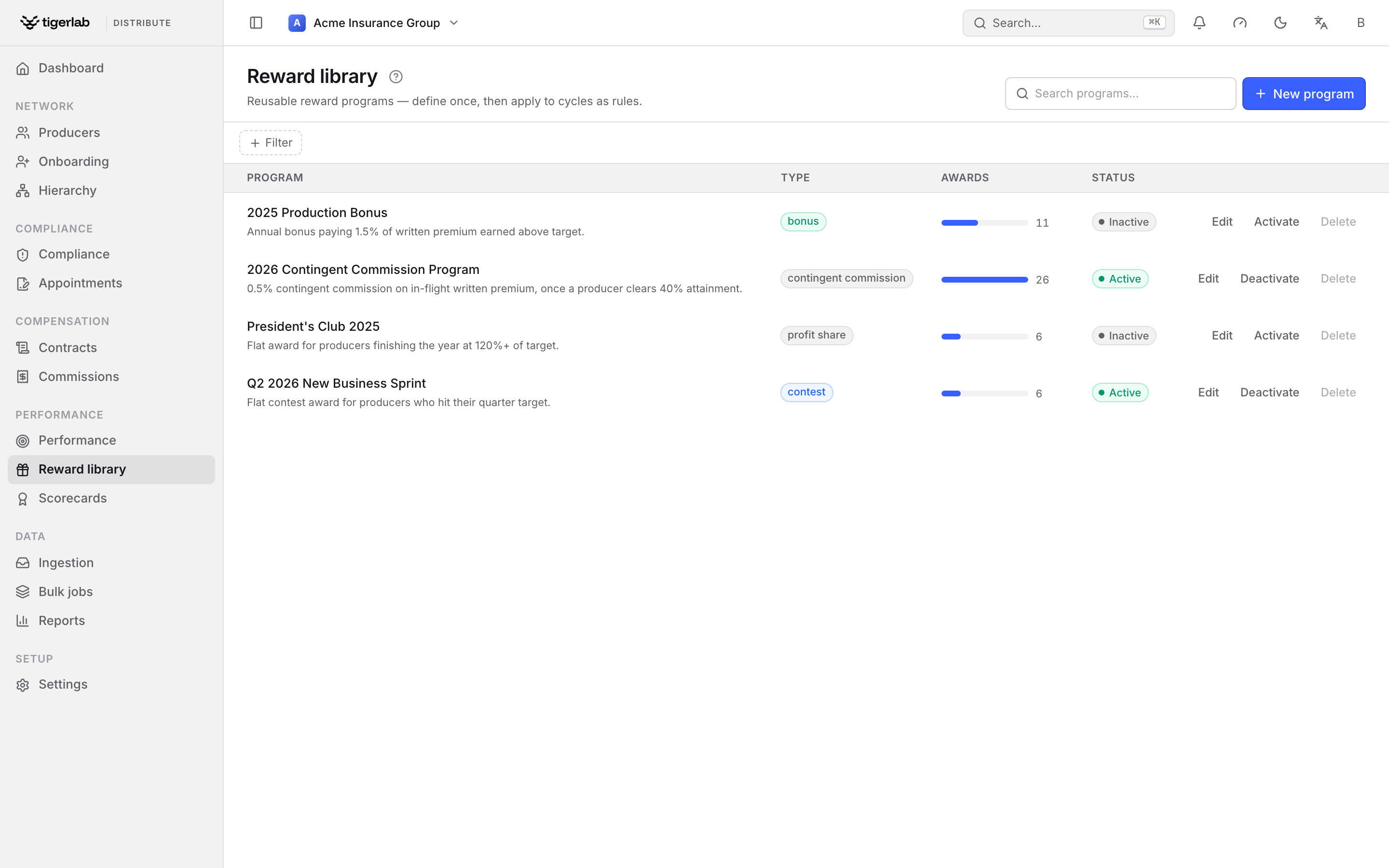
The Reward library. Each program has a type — Bonus, Contingent commission, Profit share or Contest — an award count, and an Activate / Deactivate toggle. Only active programs can be applied to a cycle.
Click New program, give it a Name and Description and pick a Type, then Create program. Programs are active or inactive: only active programs can be applied to a cycle, and deactivating one leaves its existing awards untouched. A program with awards cannot be deleted — deactivate it instead.
Rewards
The Rewards step of a cycle is where a program becomes an earning formula — one row per rule: how a goal turns into money. Click Apply reward, pick an active program and the metric and formula it should pay on:
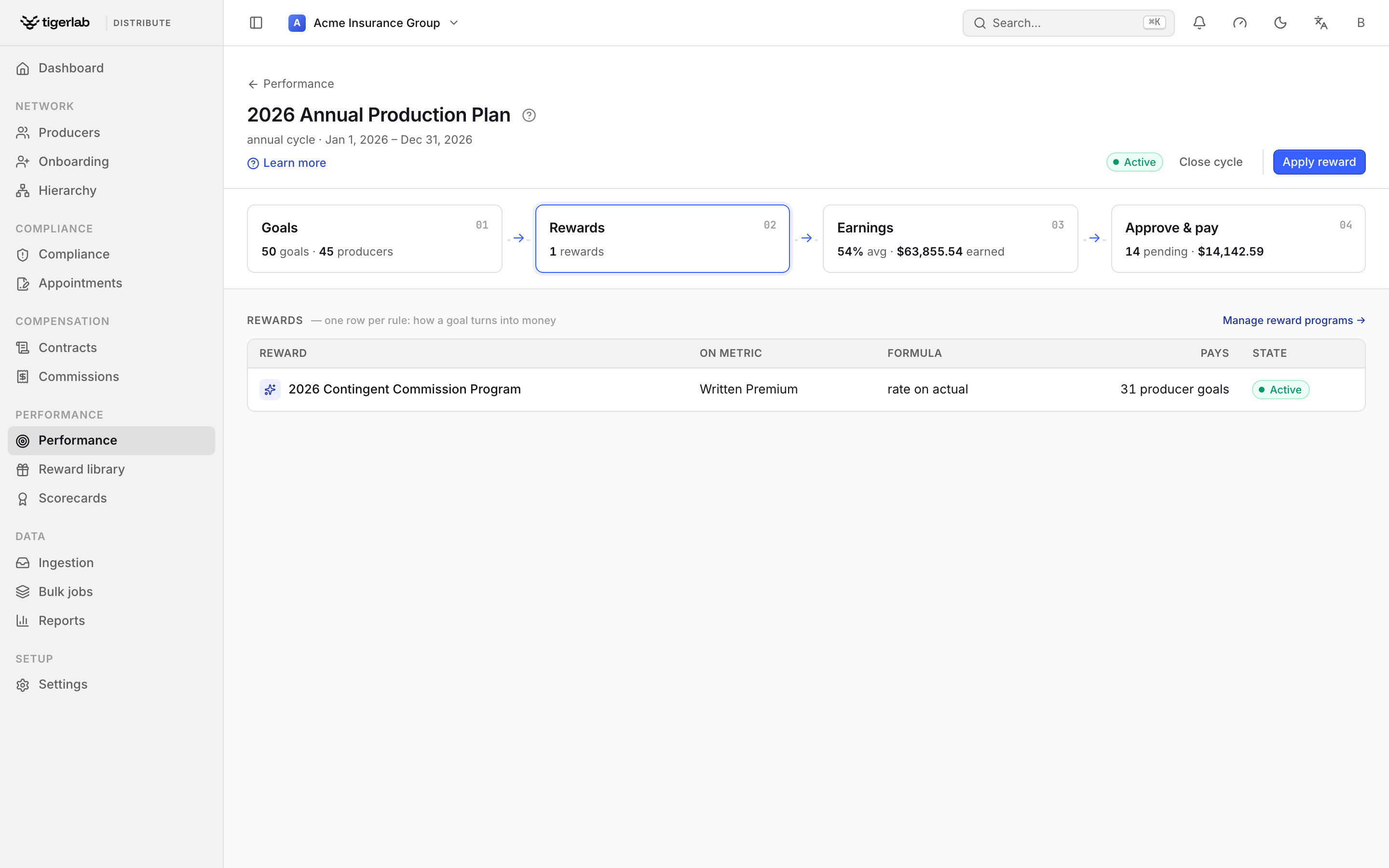
The Rewards step. Each rule binds a reward program to the cycle on a metric and a formula, and shows how many producer goals it pays. Use Manage reward programs to jump to the library.
Three formulas are available:
Rate above target — a rate on production over the goal value (e.g. 1.5% of written premium above target). The classic growth bonus.
Rate on actual — a rate on the whole production once attainment clears a threshold (the contingent-commission shape).
Flat amount — a fixed sum once attainment reaches the threshold; the only formula for policy-count goals.
As you fill the formula, a “Who this would pay” panel previews exactly who earns and how much — a live dry-run against real production, so the estimate can’t drift from what committing the rule actually produces.
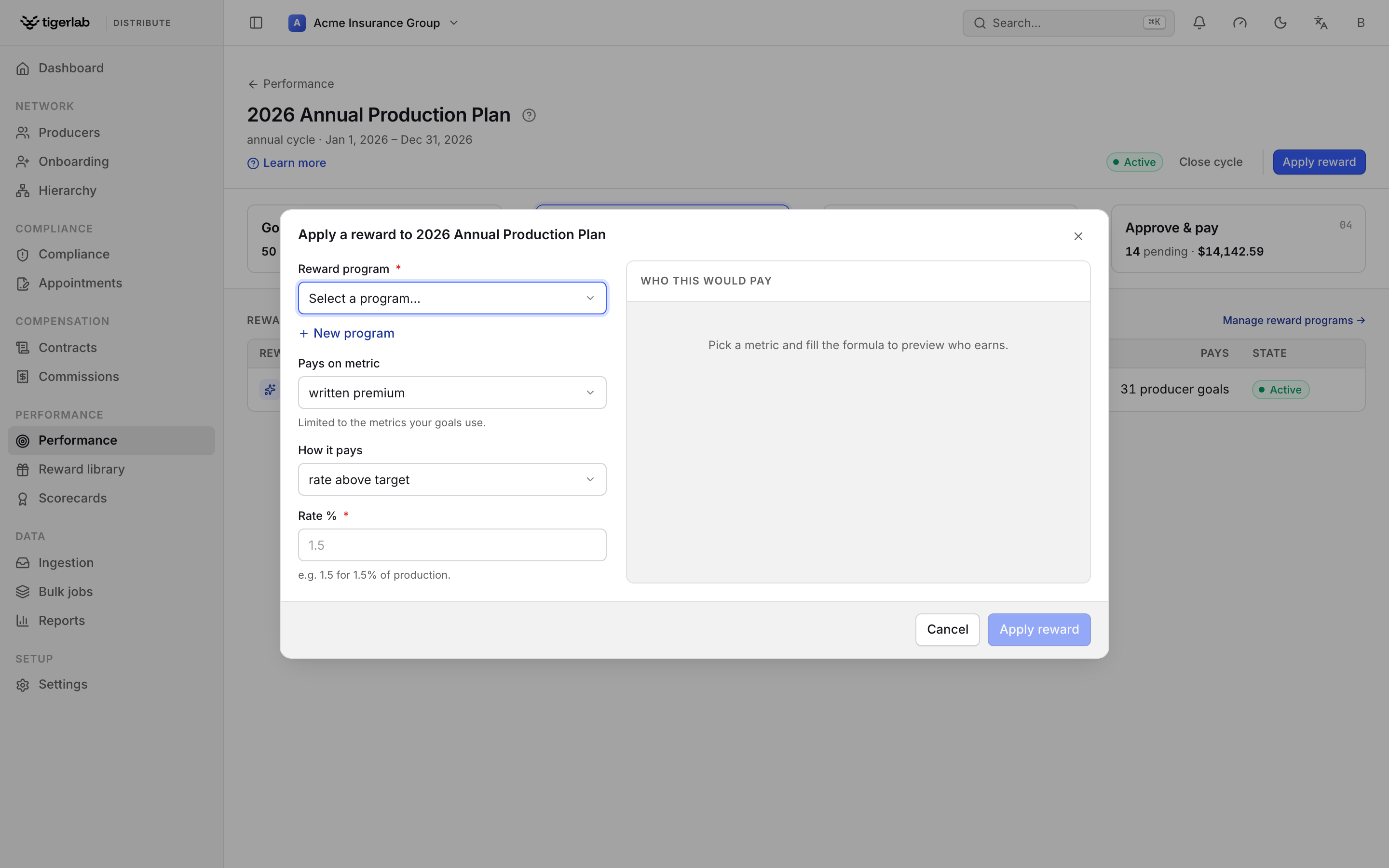
Apply a reward. Choose the program, the metric it pays on and the formula; the Who this would pay panel previews the matching producer goals and what each would earn before you commit.
Every producer-subject goal that measures the rule’s metric earns its own award. Because awards are recomputed from live production, a pending computed award follows the data — it grows, shrinks or disappears as policies are ingested or reversed — until it is approved. Team goals have no single payee, so they don’t pay. For anything a formula doesn’t cover, Grant award (on the Approve & pay step) still creates a manual award.
Earnings
The Earnings step is the cycle’s roster — who gets what, one row per person. A summary strip reads Producers, Avg attainment, Earned, To approve and Paid; below it, every producer’s row shows their progress, what they’ve earned, what’s waiting to approve, what’s paid, and where they are in the flow.
Use Group by to switch between Producer (one row per person) and Reward (the same awards grouped by the rule that produced them). A producer below target on every goal reads below target — no award; there is nothing to pay and nothing to chase.
Approve & pay
The Approve & pay step is the settlement queue: every award waiting to be signed off and paid. A summary strip reads In queue, Amount and Paid; each row carries the single action valid for its status.
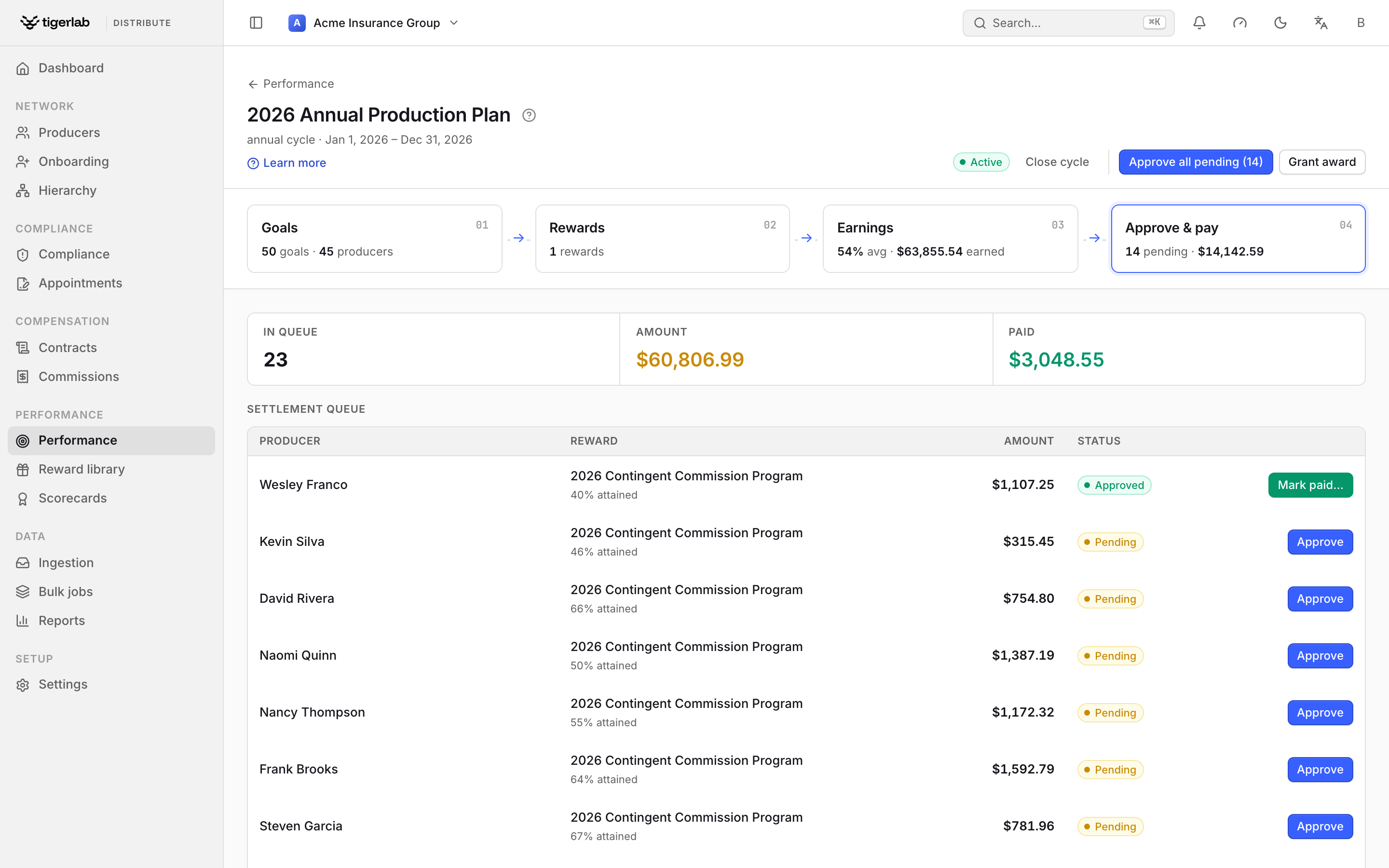
The Approve & pay step. Awards land here as pending; each row offers Approve (on a pending award) or Mark paid… (on an approved one). Approve all pending clears the queue in one move.
An award’s lifecycle is strictly ordered — no skipping, no going back:
pending ──approve──▶ approved ──mark paid──▶ paid (final)
Status |
Meaning |
|---|---|
Pending |
Computed or granted, awaiting sign-off. |
Approved |
Signed off; awaiting the actual payout. The amount is now locked — later production restatement no longer rewrites it. |
Paid |
The payout went out. Final — no further changes. |
Out-of-order actions are refused (you cannot pay a pending award, or approve a paid one). Approve all pending signs off the whole queue at once; Grant award adds a manual award for anything a reward rule didn’t cover.
Payout instructions
With payout instructions enabled (Settings), approving an award makes it payable — just as finalizing a statement does. A payment run then pays it: for an immediate-cadence producer the run fires at approval; for a scheduled producer the award waits and is consolidated with everything else payable on the producer’s next run (payouts). Either way the payout is netted against the producer’s debt and published to the PAS as part of one consolidated instruction — a bonus and a commission statement in the same currency ride the same deposit. Marking that instruction paid on the Commissions: plans, statements, splits & payouts Payouts tab flips every award it consolidated to paid automatically.
Reconciliation: catching restatement
Production keeps moving after awards are paid — policies cancel flat, premiums reverse, feeds are corrected. Reconciliation recomputes each computed award’s expected amount from its rule and today’s production and compares it to what was actually paid. The nightly sweep covers awards whose period ended within the look-back window (Settings, default 90 days), including awards on closed cycles.
Matched — the recomputed amount still equals what was paid.
Variance — the numbers diverge; managers get one notification per sweep listing the new variances.
A variance never claws money back on its own. Review it on the award’s detail page and, if a recovery is due, post a ledger adjustment (Commissions: plans, statements, splits & payouts) — the debt is then withheld from the producer’s future payouts. Where a human judgment should stand (say, an agreed settlement), record a manual reconciliation; the sweep never overwrites a manual verdict.
Tip
Set producer-subject goals at the level you manage: a goal on an MGA measures the MGA’s whole network, so you don’t need to duplicate goals down the tree unless you also manage the individual agents’ numbers.