Managing producers
The Producers screen (sidebar → Producers) is the directory of every producer in your tenant — individuals, agencies, sub-agencies, GAs and MGAs.
The producer directory
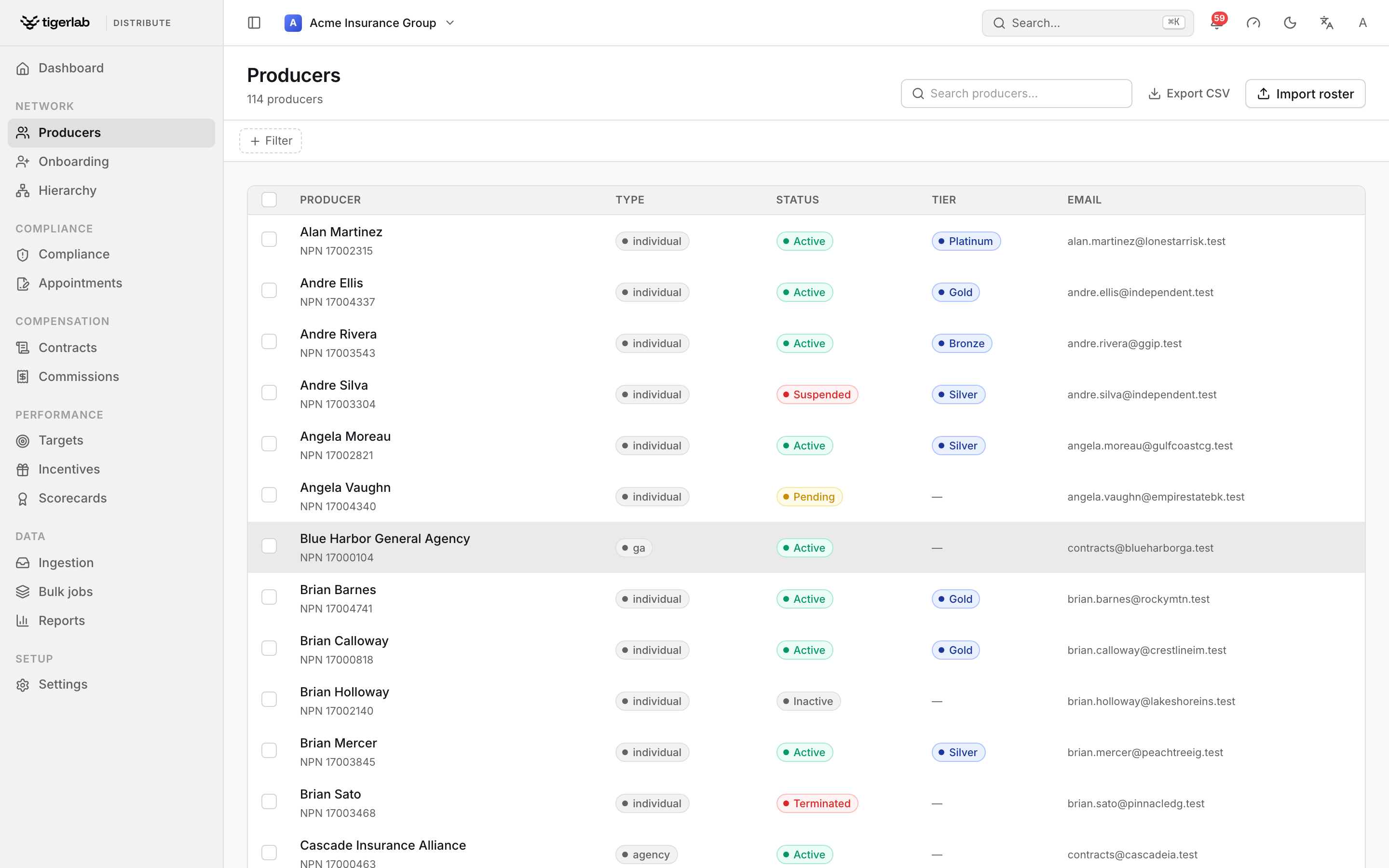
The Producers directory. Each row is a producer; the checkbox column selects producers for a bulk action, and clicking a row opens the producer’s detail page.
The list shows each producer’s name (with their NPN underneath), type, status, tier and email. Use the “Search producers…” box to filter by name, and Export CSV to download the current (filtered) list.
Tick the checkbox column to select producers for a bulk action — filing appointments, authorising products, sending contracts, syncing the registry or terminating, all validated with a preview before anything is written. The Import roster button creates producers from a CSV. Both are covered in Bulk operations.
Click any row to open the producer’s detail page.
Note
There is no “New producer” button. Producers are created by approving an onboarding application (Onboarding producers) or by a roster import (Bulk operations) — this keeps every producer’s provenance and compliance trail intact.
Producer types
Individual — a person.
Agency — a business entity.
Sub-Agency — an agency operating under another agency.
General Agent (GA) and Managing General Agent (MGA) — intermediary entities that typically sit higher in the hierarchy.
Individuals can be linked to the agency they work for through an agency membership (with a role of Principal, Producer or Staff).
Producer statuses
Status |
Meaning |
|---|---|
Pending |
Created but not yet activated. |
Active |
In good standing; can hold appointments and place business. |
Inactive |
Deactivated; not currently distributing. |
Suspended |
Temporarily barred. |
Terminated |
The relationship has ended. Terminated producers always fail the market-access check. |
Producers approved through onboarding start as active. Terminating a producer (see Appointments) also terminates all of their active appointments and stamps their end date.
Tiers
Each producer carries a performance tier (for example Platinum or Gold — whatever bands your tenant defines under Settings → Tiers). Tiers are assigned automatically from the producer’s composite score (Scorecards & producer tiers); a producer who has not been scored yet shows as not tiered. Managers can also pin a tier manually from the producer’s detail page — see the detail page below. A tier can carry a commission-rate override, which then becomes the producer’s effective commission rate.
The producer detail page
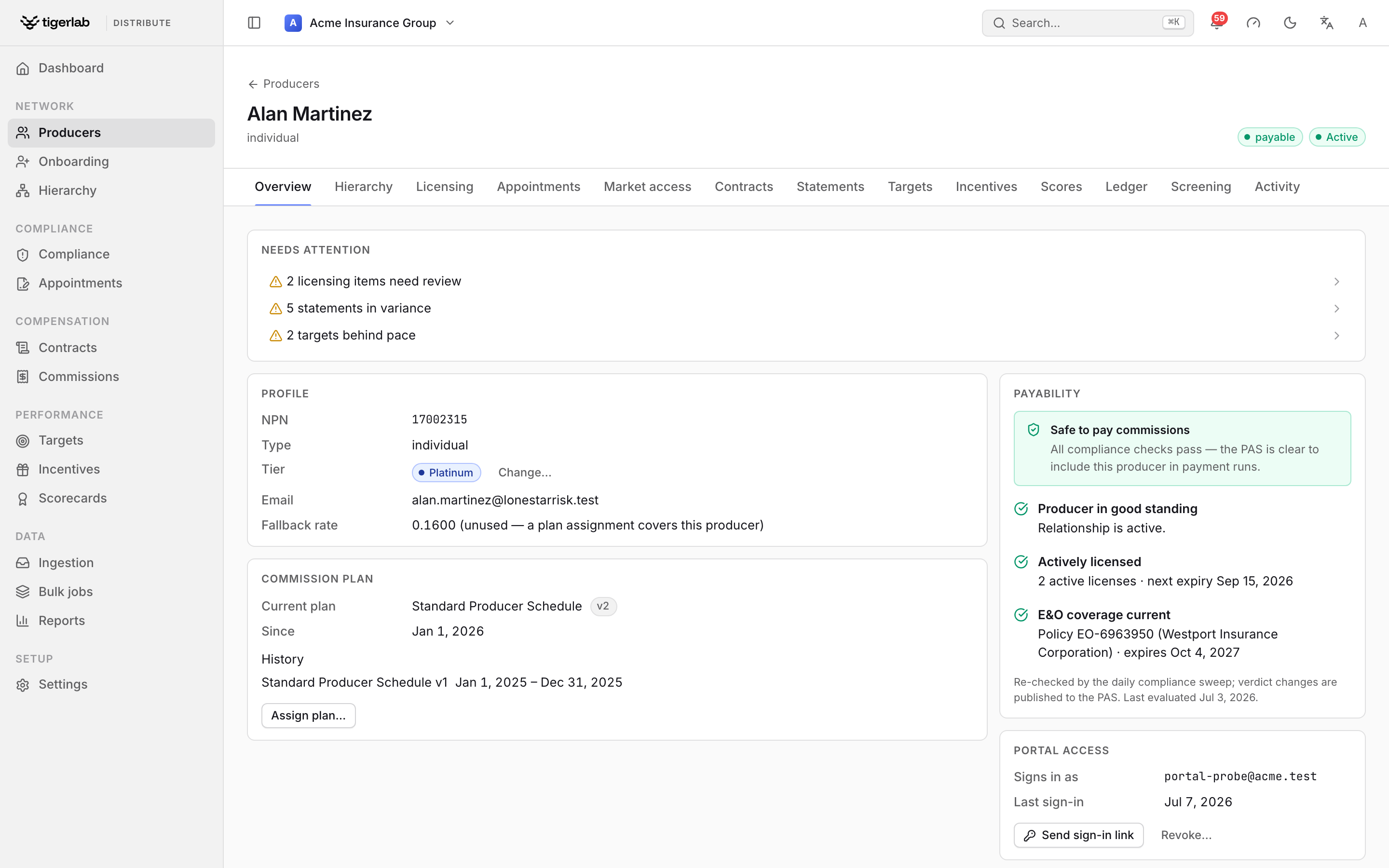
The producer detail page (the Producer Hub). Tabs across the top organise the record; the Overview tab shows the Needs attention summary, profile, commission plan and the payability verdict.
Click a producer to open their record. The header shows the display name, producer type, current status and a payability pill — payable or payout blocked (see Commissions: plans, statements, splits & payouts). Tabs organise the detail:
- Overview
Two columns of cards:
Profile — NPN, type, tier, email and the effective commission rate (marked “tier override” when the current tier’s rate override is in force). Managers can click Change… next to the tier to pin the producer to a tier or return them to automatic, score-based tiering; a pinned tier is labelled manual override and survives scoring runs.
Commission plan — the producer’s current plan assignment and assignment history, with Assign plan… for managers. “No plan assignment — statements for this producer can’t be verified against agreed rates” means exactly that (Commissions: plans, statements, splits & payouts).
Payability — the “Safe to pay commissions” / “Commission payout blocked” verdict with the per-requirement evidence (active, licensed, E&O current).
Portal access — grant, revoke or re-send the producer’s self-service portal sign-in (The producer portal).
- Licenses
Every license on file: number, status, expiry date and a flag pill — green ok, yellow expiring (within 30 days) or red expired. See Licenses & E&O coverage.
- Appointments
The producer’s appointments: writing company, status, whether it was a just-in-time (JIT) appointment, and effective date. See Appointments.
- Scores
The producer’s composite performance score and its dimension breakdown. See Scorecards & producer tiers.
- Ledger
The producer’s money standing: their payment schedule, per-currency balance chips (positive = the producer owes), their draw agreements, and the append-only debt ledger — advances posted against draws, chargeback carry-forwards from negative statements, recoveries withheld from payouts, and manual adjustments. Managers can add a draw agreement (amount, currency, window, recoverable or not) and post adjustments (positive increases what the producer owes, negative credits them — corrections are always offsetting entries, never edits). Advances are posted per period from the API and are idempotent, so a re-run never double-posts. How balances affect payouts is covered in Commissions: plans, statements, splits & payouts.
The Payment schedule card sets how this producer is paid (only effective when payout instructions are enabled tenant-wide, see Tenant setup & administration):
Cadence — Immediate (the default: paid the moment a statement is finalized or an award approved), or Weekly / Monthly / Quarterly, where a nightly payment run consolidates everything payable since the last run into one instruction per currency.
Minimum payout — an optional floor, in the tenant base currency; a run whose net falls below it (and has no debt to recover) holds the payables for the next run instead of cutting a tiny cheque.
Run payment now — settles the producer immediately (finance control), consolidating whatever is currently payable. The card shows how many currency pots are payable right now. Payment runs are covered in full in Commissions: plans, statements, splits & payouts.
- Screening
Background checks ordered with your screening partner (Accurate, Verified First, Checkr, or recorded manually). Managers can Order check, Refresh a pending one, record the outcome (clear, consider or failed) or cancel. A check that does not come back clear notifies managers — “Background check needs review” — and every completion is published to your webhook subscribers (Integrations: PAS data & webhooks).
- Activity
The producer’s audit trail: every consequential action on their record — filings, contract events, alert triage, hierarchy moves, profile changes — with when, what, who (or system) and the detail. The trail is append-only; nothing can be edited out of it.
Market access — “can this producer place this business?”
The platform’s readiness check answers, for a producer + product + jurisdiction (and optionally a specific writing company), whether business can be placed right now. Five independent conditions are evaluated:
Check |
Passes when… |
|---|---|
Licensed |
The producer holds an active, unexpired license in the jurisdiction. |
Appointed |
The producer holds an active appointment in the jurisdiction (with the specific company, if one was named). |
Product authorised |
An active, unexpired product authorisation exists for the product. |
E&O current |
The producer has active, unexpired E&O coverage. |
Not terminated |
The producer’s status is anything but terminated. |
All five must pass for the overall verdict (can place) to be positive. When a placement is blocked, the individual flags tell you exactly which prerequisite is missing — for example licensed and appointed but E&O lapsed.
Teams
Producers can be grouped into flat teams (for example a region or a book of business). Teams matter mainly for targets: a team-subject goal sums the production of all producers assigned to the team (Performance cycles). A producer can belong to several teams, and assignments can be deactivated without being deleted.