Integrations: PAS data & webhooks
tigerdistribute does not administer policies — it connects to your Policy Administration System (PAS) and other systems in two directions:
Inbound ingestion — policy and commission data flows in and feeds targets, scorecards and commission statements.
Outbound webhooks — distribution events (for example producer onboarded) flow out to systems you subscribe.
This chapter is aimed at the tenant’s integration/operations staff.
Inbound: data ingestion
Data arrives in ingestion batches. A batch records its source system, an optional external reference, the batch type (policies, commissions or mixed) and its processing status (pending → processing → completed, or failed), together with counts of the policies and commission transactions it carried.
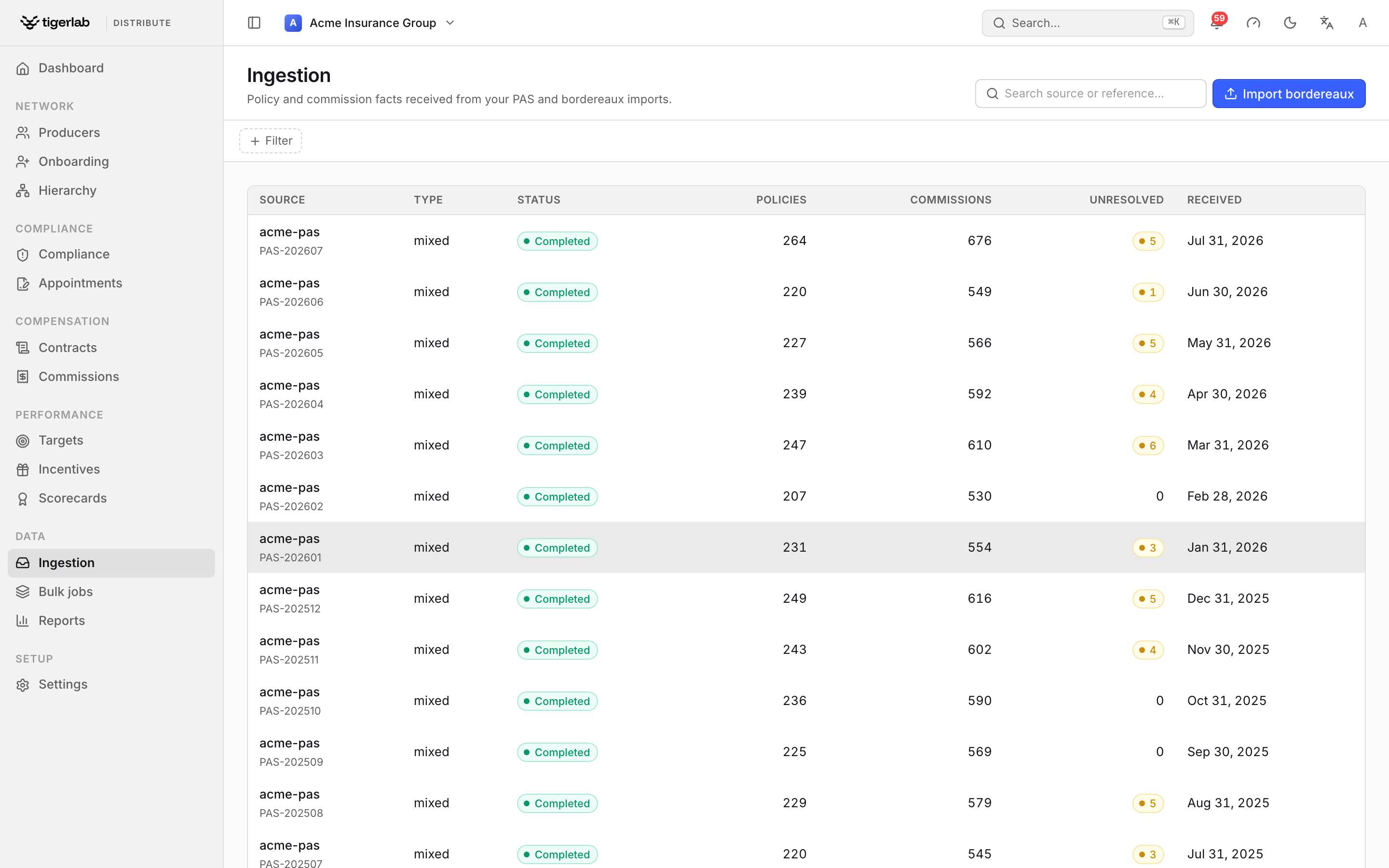
The Ingestion screen (sidebar → Ingestion) lists every batch received from your PAS and bordereaux imports. The Unresolved column counts rows whose NPN could not be matched — these are kept, never dropped.
What each record carries:
- Ingested policies
External policy id, policy number, product code, jurisdiction code, the transaction type (new business, renewal, endorsement, cancellation), written premium and its currency, effective/expiration dates and an as-of date. These are the facts behind target attainment and the volume side of scorecards.
- Ingested commission transactions
External transaction id, policy number, the kind (base, override, bonus, chargeback), amount and its currency, and transaction date. These are the facts behind commission statements and the commission figures in scorecards.
Note
Rows keep their native currency. A row that names no currency is never guessed — it is stored with the currency left blank and counted in the batch’s currency gaps queue for you to confirm (see below), so foreign money can’t be silently mis-tagged as your base currency. An unknown ISO 4217 code is rejected outright with the offending row named. Batches may freely mix currencies — segregation and conversion happen downstream (statements are per-currency; totals convert via your exchange rates).
Note
The tenant’s commission feed setting decides how the two record kinds are used: with PAS sends calculated commissions (the default), statements list the PAS’s transactions and verify them against the agreed plan rates; with Policies only — platform calculates, the platform computes the commission lines from ingested policies and the plan. See Commissions: plans, statements, splits & payouts and Tenant setup & administration.
Producer matching by NPN
Each ingested row names its producer by NPN (national producer number). The platform resolves the NPN to a producer record in your tenant.
Note
Rows whose NPN cannot be matched are kept, never dropped — they are stored with the NPN retained and counted in the batch’s unresolved counter. Keep producers’ NPNs accurate (see Onboarding producers) so production lands on the right records, and watch the unresolved count on your batches.
Confirming currency gaps
When a feed (typically a bordereaux whose column mapping has no currency column) delivers a row without a currency, the row is held rather than guessed. Open the batch and use the Currency gaps tab: it shows how many policies and commissions are affected, and a Confirm action where you pick the correct ISO 4217 code and stamp it onto every gap row in the batch at once. The batch’s Currency gaps count on the Ingestion list drops to zero once confirmed.
Warning
Until a currency gap is confirmed, the affected rows are excluded from money math — generating a commission statement or a performance snapshot that would include them fails with a clear unconfirmed currency error naming the batch, rather than producing a number that is silently off by an exchange rate. Confirm the currency first, then generate.
Outbound: webhooks
When something notable happens in the platform — for example an
onboarding application is approved and a producer is provisioned — an
event is recorded and delivered to every webhook endpoint your
tenant has registered. Notable event types include producer
onboarded, ContractSignedV1 (a contract was executed),
ProducerPayabilityChangedV1 (a producer’s payability verdict
flipped — subscribe your PAS to this so it suppresses blocked
producers from its payment runs, see Commissions: plans, statements, splits & payouts),
PayoutInstructedV1 (a payment run produced an instruction) and
BackgroundCheckCompletedV1 (a screening result arrived).
The PayoutInstructedV1 payload carries the instruction id, producer,
run date, currency, gross, recovery applied, net pay, and a
sources array — one entry per statement or award the run
consolidated (with its id, amount, period and, for awards, the program
name). Subscribe your PAS to this event, disburse exactly the net
amount, and de-duplicate on the instruction id. One instruction may
consolidate several statements and awards into a single deposit; the
sources array is your line-item breakdown.
Note
PayoutInstructedV1 replaces the earlier
CommissionPayoutInstructedV1 and IncentivePayoutInstructedV1
event types — one consolidated event now covers both commission and
incentive payouts.
Managing webhook endpoints
Each endpoint is a subscriber URL with a name, a signing secret and an active flag. Endpoints can be created, edited, deactivated and removed by tenant staff.
Warning
The secret is write-only: it can be set but never read back. Store it in your receiving system when you create the endpoint.
What a delivery looks like
Each event is POSTed to every active endpoint as a JSON envelope containing the event id, event type, the aggregate it concerns (type and id), when it occurred, and the event payload. The request carries:
X-TigerDistribute-Signature—sha256=<HMAC-SHA256>of the body, computed with your endpoint’s secret. Verify this before trusting a delivery.X-TigerDistribute-Event— the event type.X-TigerDistribute-Delivery— the unique event id. Deliveries are at-least-once: the same event can arrive more than once (for example after a partial failure), so use this id to de-duplicate.User-Agent: TigerDistribute-Relay/1.0. Deliveries time out after 10 seconds — respond quickly (accept, then process asynchronously).
Delivery, retries and dead-lettering
Events are queued and delivered by a background relay that runs every minute per tenant:
An event is marked published only once every active endpoint has accepted it.
On failure the relay retries with exponential backoff — 1 minute, 2, 4, 8… capped at 1 hour between attempts — recording the attempt count and the last error.
After 8 failed attempts the event is marked failed (dead-lettered) and stops retrying.
Each event’s outcome is committed on its own, so a failure part-way through a sweep never rolls back events already delivered earlier in the same run — they stay published and are not re-sent. This keeps the at-least-once contract while avoiding a burst of duplicate deliveries; keep de-duplicating on the delivery id regardless.
If your tenant has no active endpoints, events simply wait as pending — nothing is lost; register an endpoint and they deliver on the next relay run.
Monitoring and recovery
The event queue is visible to tenant staff with each event’s status (pending, published, failed), attempt count and last error, and is filterable by event type and status. Two manual controls exist:
Relay now — run a delivery sweep immediately instead of waiting for the scheduled run; it reports how many events were delivered, retried, failed and skipped.
Retry — re-queue a single failed (dead-lettered) event for immediate redelivery once you have fixed the receiving side.
Provider connections
Background-check and license-registry work runs through external providers (Checkr, Accurate, Verified First; NIPR, PDB, FCA). On Settings → Integrations you pick the tenant’s default screening and registry providers and, where a provider supports it, connect your own vendor account so calls are billed to you instead of running on tigerlab’s account.
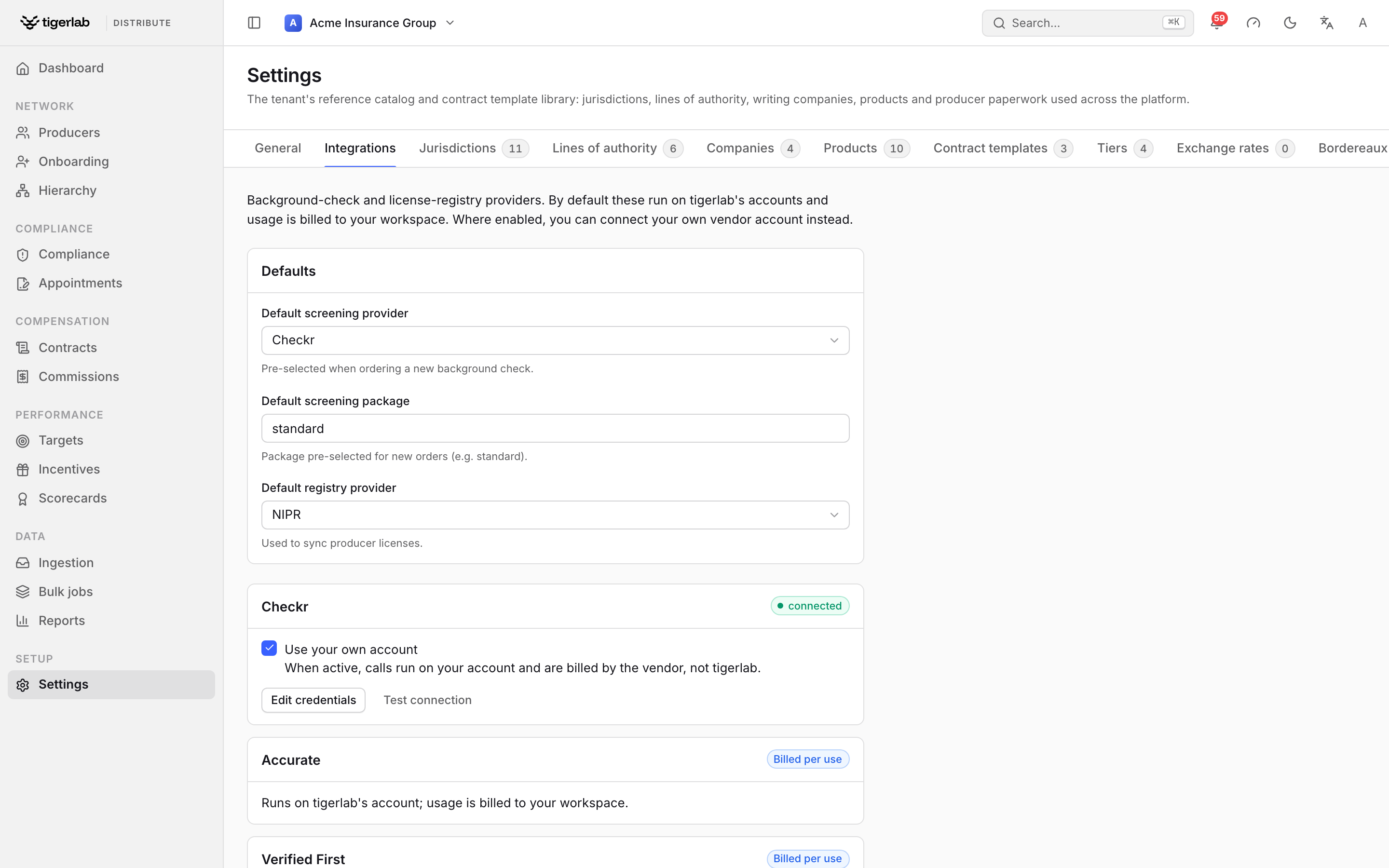
Settings → Integrations: the default screening and registry providers, and a card per provider showing its connection status — connected (your own account) or billed per use.
Registry synchronisation
Independent of the PAS feed, the platform can query external producer registries — NIPR, PDB, FCA, or manual/CSV import — to pull a producer’s licenses by NPN. See Licenses & E&O coverage for how sync results affect license records; every sync attempt is logged with its status (success, partial, failed) and any field-level errors, and can be triggered on demand per producer.